Order from a supplier
A purchase order (Bestellung) records what your company buys from a supplier, at which net prices, delivered where. It shows no VAT: the tax on a purchase is decided on the supplier’s invoice.
Raise one
Section titled “Raise one”-
Open Purchasing → Purchase Orders and choose Create.
-
Choose the Supplier. Its address, Our Customer Number, currency, payment terms and payment method fill in from its Supplier role. With one own company, it fills in as the Buyer.
-
Choose the Receiving Location the goods go to. Its address fills in as the Delivery Address; without one, your company’s address does.
-
Add lines: choose a product and set the quantity. The line’s Supplier Price fills in with the supplier’s cheapest supplier price at that quantity; below every scale, none fills in. Its article number, product name, unit and price fill in, with the Expected date from the lead time. To order a different article, such as another pack size, choose another Supplier Price on the line. It stays when the quantity changes; the price follows its scales.
-
Choose Save. The order is a draft.
-
Choose Release. The order takes its number from your company’s Purchase Order Series.
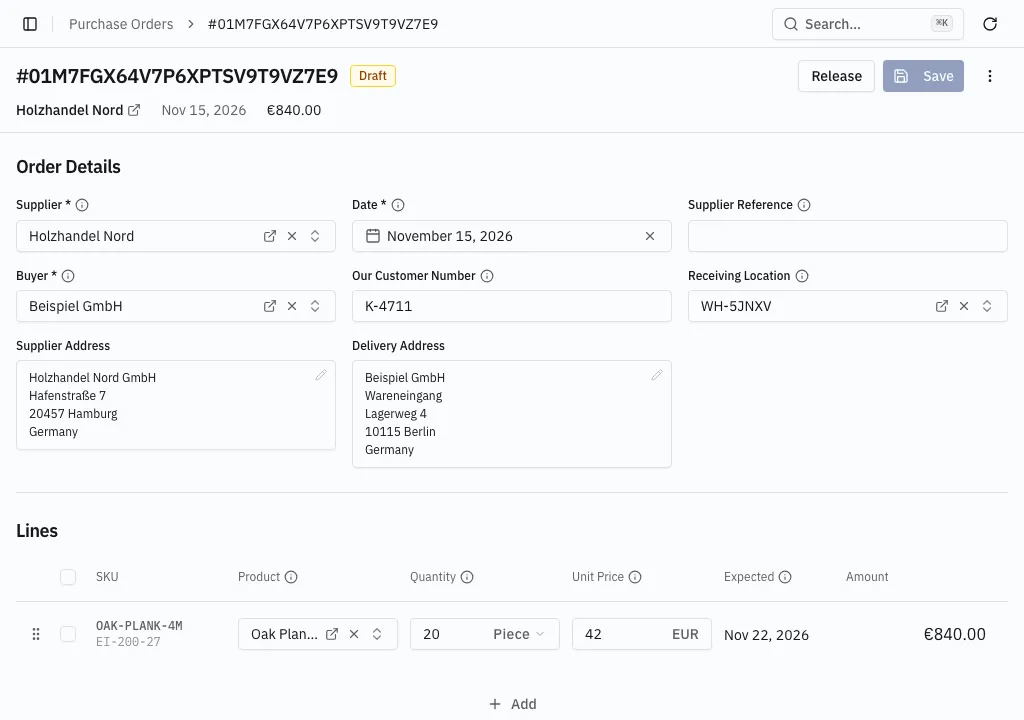
The order adds the lines up into its Net Amount; when a discount lowers it, the amount before the discount sits struck through beside it. A purchase order states no VAT, so the net amount is its total.
Send it
Section titled “Send it”More actions (⋮) → PDF prints the order as a Bestellung: on your company’s letterhead or stationery, the supplier’s address, Unsere Kundennummer, the lines with your article number and the supplier’s (Ihre Art.-Nr.), the net total and the expected delivery dates.