Record a movement
Record stock movement on the Stock screen books an unplanned receipt, issue or transfer. A position’s shortcut under Details opens the same dialog with the position already chosen.
The dialog books one position at a time.
Book it
Section titled “Book it”-
Choose Book in, Book out or Transfer.
-
For Book in, choose the product, the destination, the owner and any restriction. A lot-tracked product requires a lot. The owner defaults to your company when exactly one own-company record exists.
-
For Book out or Transfer, choose the Product and From location, then the matching position. A sole match is selected automatically.
-
For Transfer, choose a different destination.
-
Enter a positive Quantity and a Reason.
-
Review Planned movement — direction, quantity, and the stock dimensions.
-
Confirm with Book in, Book out or Transfer. The movement is posted and cannot be edited or deleted afterwards.
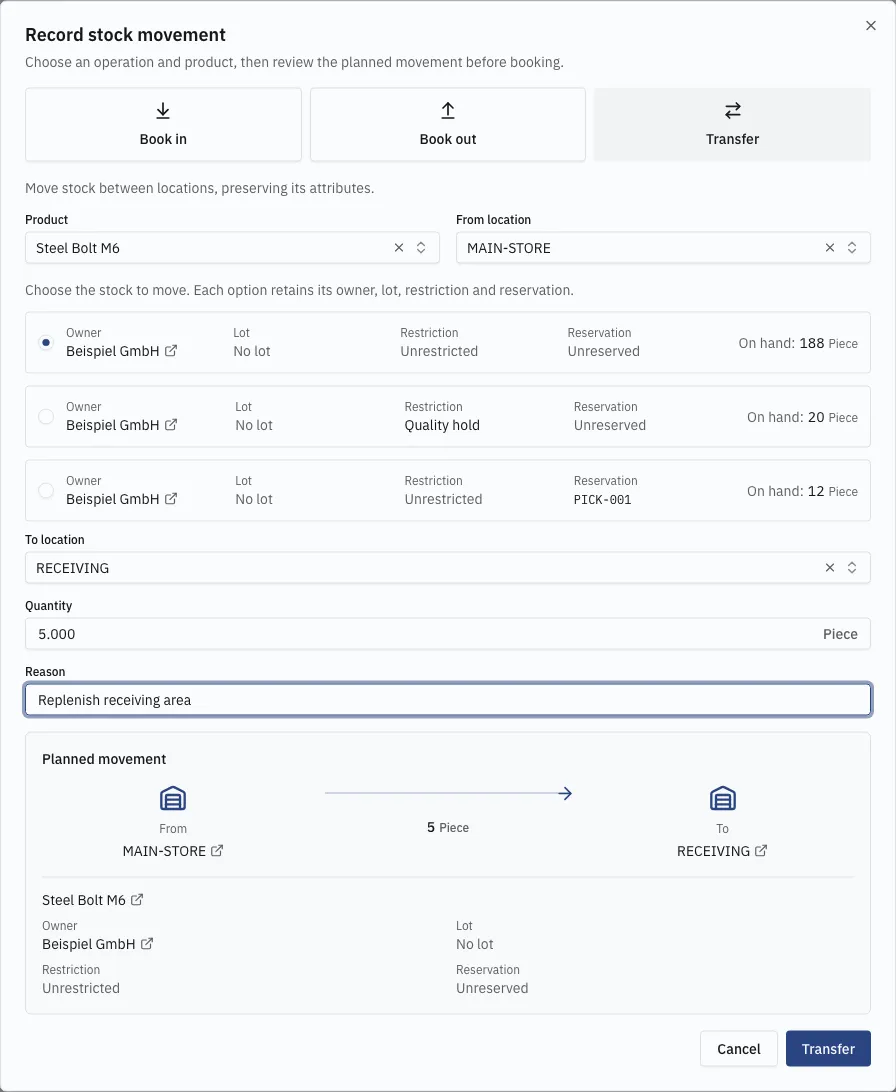
Switching operation resets the form.
Restricted and reserved stock
Section titled “Restricted and reserved stock”Restricted stock can be transferred, and the restriction moves with it. Twenty pieces on a quality hold are still twenty pieces on hand even though available is zero, and moving five to another bin keeps the hold on those five.
An explicit manual issue can also remove restricted, unreserved goods — for disposal, say. Neither operation releases a restriction.
Reserved stock cannot be issued or moved by an ordinary movement. It is released by the fulfillment order holding it.
When a booking fails
Section titled “When a booking fails”The server checks stock again on save, so a booking can fail even though the displayed quantity looked sufficient — another movement consumed it first. Stock can never go negative, and the whole movement succeeds or fails together.