Actions
An action is a named step in a business process, run on one business object: Complete or Cancel order on a sales order, Create Invoice from it, Cancel Invoice or Correct Invoice on an invoice, Reserve or Close on a fulfillment order. Editing changes what a business object says; an action moves the business forward, often by creating the next document.
Where actions are
Section titled “Where actions are”More actions (⋮) at the top right of a form lists what can be done to it right now: Archive or Restore, its actions, History, PDF and Delete. On a draft the menu holds only Delete, because a draft takes part in no process until it is released.
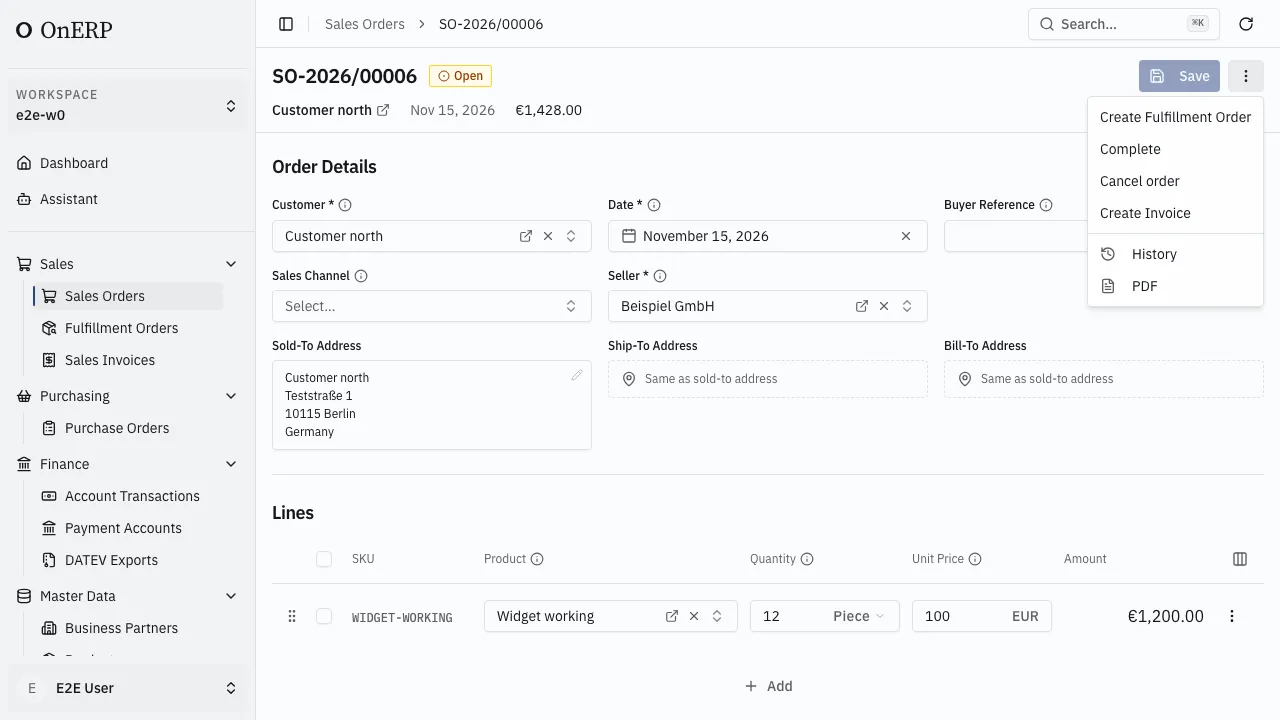
Before an action runs, OnERP asks for confirmation, or opens a dialog for what the action needs, such as the lines and quantities to invoice. An action either completes in full or changes nothing.
Why an action is missing
Section titled “Why an action is missing”The menu lists only the actions that apply to this business object, for you, at this moment. An expected action is missing for one of two reasons:
- The order or invoice has moved past it. A completed sales order offers no Complete, no Create Invoice and no Cancel order. An invoice that has already been cancelled or corrected offers no Cancel Invoice.
- Your role does not grant it. Actions are granted one by one, separately from reading and editing. A role with full access to invoices still cannot cancel one until Cancel Invoice is granted. Release, Archive and Restore come with permission to edit. See People and access.
With unsaved changes, actions and status changes are shown greyed out with the hint “Save or discard your changes first.” An action works on what is saved.
Actions are recorded
Section titled “Actions are recorded”Every action that runs appears in the history under its name, with who ran it, whether or not it changed anything. A business object an action creates or changes elsewhere names the action that caused it, such as an invoice showing via the order’s Create Invoice. See History and editing together.
The same actions, with the same rules and permissions, are available to the assistant and to integrations signed in with a service account. See Areas and access.
Every action at a glance
Section titled “Every action at a glance”The Actions section of each kind of business object in the data model lists its actions and what each asks for. What a sales order’s actions do to its status is in Sales order status; the invoice actions are in Cancellations and corrections.