Tax
Almost all of the tax machinery is in place before anyone touches it.
Tax jurisdictions — each country’s VAT rates — are seeded and read-only under Configuration → Tax Jurisdictions. Rates are never entered by hand. Territories with their own rate schedule (the Azores, the Canary Islands, Réunion) are jurisdictions in their own right, several of them outside the EU VAT area.
Tax classifications are seeded too — Standard, Reduced and Exempt, each with a default entry. The one job at setup is checking they cover the product range.
Check a classification
Section titled “Check a classification”-
Open Configuration → Tax Classifications and click one.
-
Read its Entries. Each pairs a Jurisdiction with a Tax Category.
-
An entry with Jurisdiction empty is the default — the category that applies where no specific rule exists. An entry naming a jurisdiction overrides that default in that country.
-
Add an entry for any country where this classification is taxed differently.
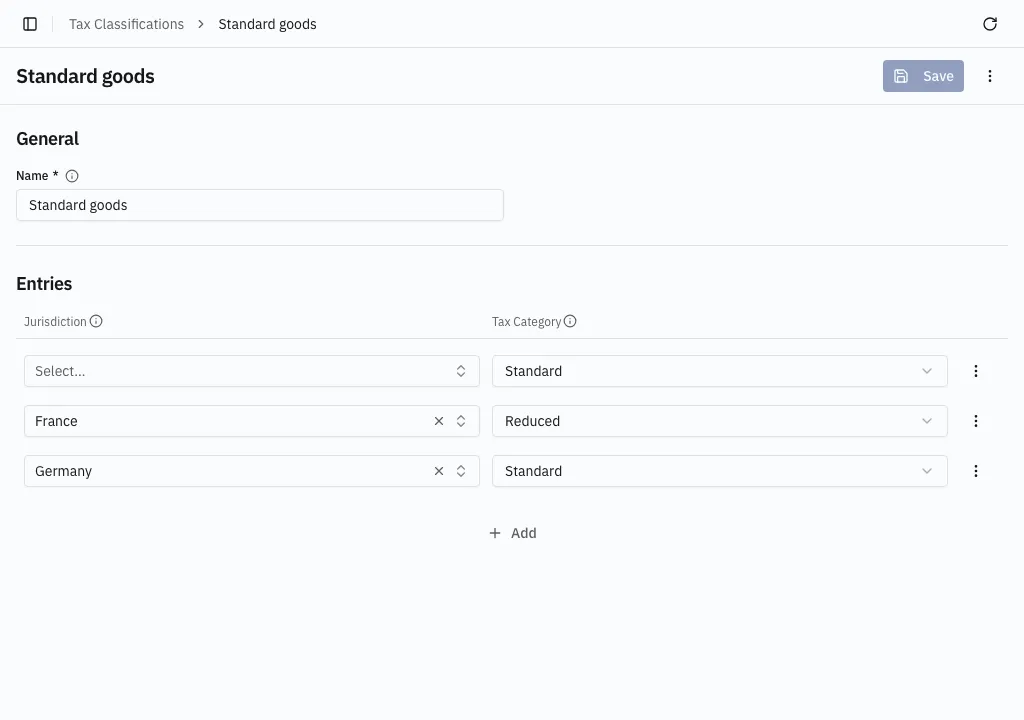
The category is one of six — Standard, Reduced, Second Reduced, Super-Reduced, Zero Rate or Exempt — never a percentage. The percentage comes from the jurisdiction’s own rate table. So “Standard goods” is Standard by default and Reduced in France.
Two rules checked on save
Section titled “Two rules checked on save”- A classification needs its default entry — one entry with no jurisdiction.
- A jurisdiction must publish the rate named. Germany publishes a standard and a reduced rate but no super-reduced one, so a Germany entry set to Super-Reduced cannot be saved.
Putting it to work
Section titled “Putting it to work”Every product must name a classification; it is a required field on the product form. From then on the rate is picked automatically — the classification gives the category, the jurisdiction’s rate table gives the percentage.
The full rules, including cross-border sales, are in How tax is decided.