The dashboard
The dashboard is the first screen after signing in and the Dashboard entry at the top of the sidebar. Every number on it is read live from the workspace; nothing is a sample.
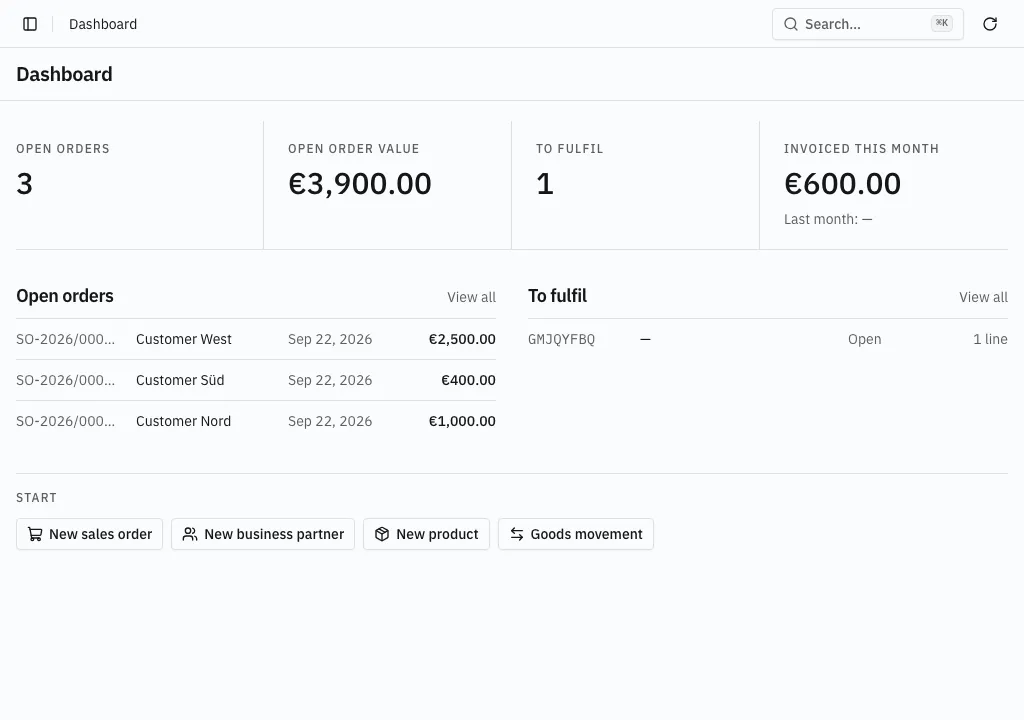
The figures
Section titled “The figures”| Figure | What it counts |
|---|---|
| Open orders | Sales orders still open — not completed, not cancelled. |
| Open order value | The net amount of those orders, one line per currency. Nothing is converted between currencies. |
| To fulfil | Fulfillment orders that are open or reserved — goods still to be picked. |
| Invoiced this month | The net amount of invoices dated this calendar month, with cancellations and corrections taken off. The previous month sits underneath for comparison. |
Choose a figure to open the list it was counted from, already narrowed to those records — Open orders opens the sales order list on its Open tab.
Amounts in more than one currency stay separate lines. A figure with nothing behind it shows an em-dash.
The lists
Section titled “The lists”Open orders shows the five most recent open sales orders with their customer, date and net amount. To fulfil shows the five most recent fulfillment orders still to be picked, with their warehouse and phase. Choose a row to open the record; choose View all for the full list.
The row at the bottom opens an empty form: a new sales order, a new business partner, a new product, or a goods movement. On a fresh workspace this row is where the first records come from.