The command palette
The Search… field in the header opens the command palette. It lists every screen in the sidebar, a New … entry for every kind of record, and the records whose name or number contains what has been typed.
Opening it
Section titled “Opening it”Click Search… in the header, or press ⌘K on a Mac and Ctrl+K elsewhere. The same shortcut closes it again, as does Esc.
Going somewhere
Section titled “Going somewhere”Type part of a screen’s name and press Enter, or click the entry. Sales Orders opens the list; New Sales Order opens an empty order ready to fill in. Arrow keys move the highlight.
The entries under Pages are the sidebar, flattened: the dashboard, the assistant, and every list. The entries under Create are every record kind with its own form.
“prod” finds Products, New Product, Product Categories and Product Types.
Finding a record
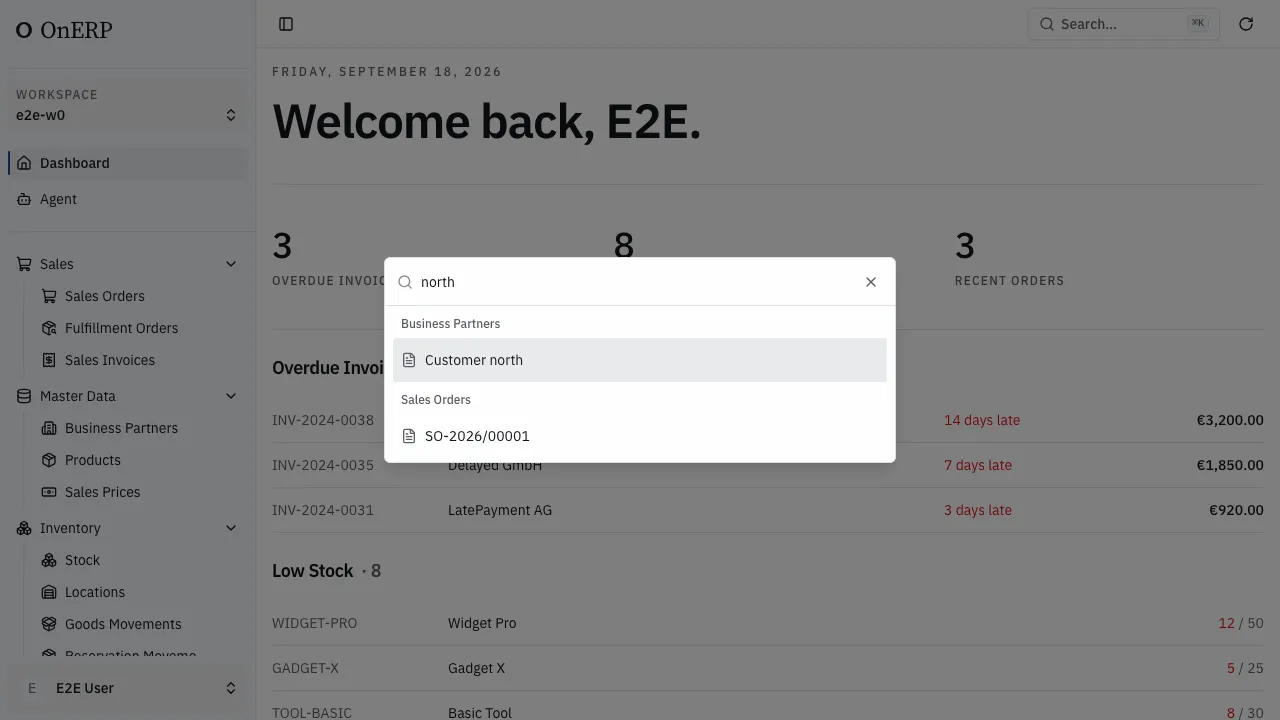
Section titled “Finding a record”From the second character on, the palette also searches records. Each kind that has a match gets its own group — Business Partners, Sales Orders — with up to five records in it. Choosing one opens the record.
The fields a record is found by are the same ones its list searches: a partner by name or address, a document by its number, a product by name or SKU. Archived records are not offered. Pasting a record’s full identifier finds it whatever its fields hold.
Every kind the palette is allowed to show is one the role can read. A kind the role cannot read is absent from the results, not shown empty.