History and editing together
Every change to a business object is recorded with who made it. While one is open, the form shows who else is changing it, and a save never overwrites a change made in the meantime.
History
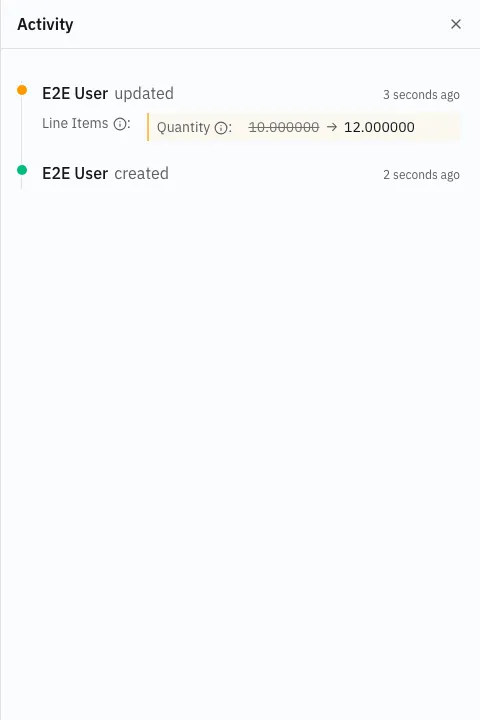
Section titled “History”More actions (⋮) → History opens Activity, a timeline of everything that has happened to the business object, newest first. Drafts have no history; it starts at release.
| Entry | Meaning |
|---|---|
| created | It was created or released. |
| updated | A field changed. |
| deleted | It was removed. |
| archived | It was retired from lists and pickers. |
| restored | It was brought back. |
| an action’s name | An action ran on it, whether or not it changed anything. |
Choose an entry to expand it. It lists the fields someone entered, with their values before and after. Values OnERP works out itself, such as a total or a document number, are not listed. A deletion lists every field it had. The timeline refreshes on every save.
Who made the change
Section titled “Who made the change”An entry names the person who was signed in. A change made through Assistant names the person who approved it.
Work that runs in the background without a person shows as OnERP (automatic). The PDF of a released invoice, for example, is stored a moment after release.
A change that followed from an action on another business object says via that action and names it. An invoice created from an order shows the order’s Create Invoice action this way.
Stock has its own, more detailed trail: every quantity has a ledger entry that names the document behind it. See Stock and the ledger.
Being edited by
Section titled “Being edited by”As soon as someone types a change into a saved form, everyone else who has the same business object open sees that person’s initials in a circle at the top of the form, beside the buttons. Lists show the same circles next to it in the first column. Hover the circles to read Being edited by and the names.
The circles disappear when the change is saved or discarded, or the form is closed. A form for something new and a draft show no circles.
When both save
Section titled “When both save”The first save goes through. The second is refused with the message “This … was changed by someone else since you opened it. Reload to see the changes.” The refused edits stay on screen until you reload.
Reload, check what the other person changed, and make your change again. The same applies to a status change or an action started on a business object that someone else has saved in the meantime.