Record history
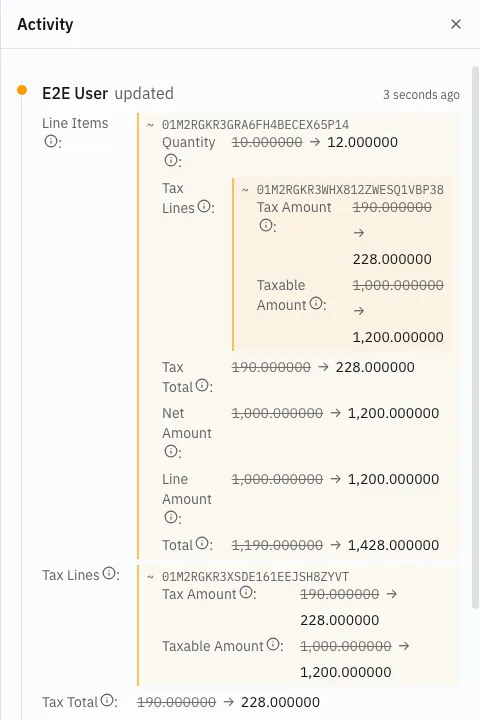
History in a record’s ⋮ menu opens Activity — a timeline of everything that has happened to that record, newest first.
What the timeline shows
Section titled “What the timeline shows”Each entry carries when it happened, who did it, and which kind of change it was:
| Entry | Meaning |
|---|---|
| created | the record came into being |
| updated | a field changed |
| deleted | the record was removed |
| archived | retired from lists and pickers |
| restored | brought back into service |
Clicking an entry expands it in place to show what actually changed — the fields touched, and their values before and after.
Who “who” is
Section titled “Who “who” is”An entry names the person signed in when it happened. Where a change was made by something rather than someone, the entry says so:
- via an action — the change was a consequence of running an action, not of someone typing in a field. Releasing an order writes its number this way.
- via another record — the change followed from a change elsewhere, and the entry names the record that caused it.
That distinction is the point of the timeline. A figure nobody typed still has a traceable cause.
Availability
Section titled “Availability”History is offered on saved, operational records. A draft has none; nothing that happens to a draft is part of the business record yet.
The timeline refreshes on every save, so a change made and then questioned is visible immediately.
What it answers
Section titled “What it answers”- Who changed this, and when?
- Was this figure typed, or derived? An entry made via an action or another record was not typed.
- What did this record look like before? Expand the entry before the change.
Stock is traced separately and in more detail: every quantity has a ledger entry naming the document behind it. See Stock and the ledger.