Actions and archiving
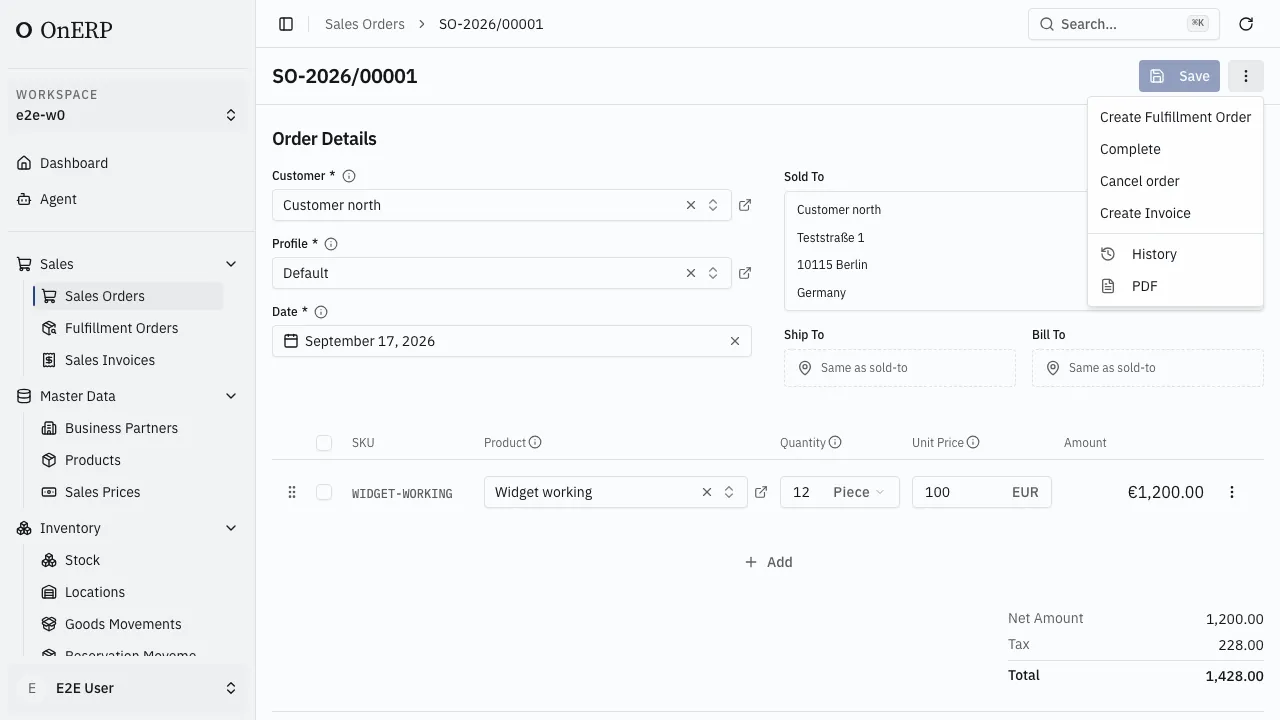
The ⋮ menu at the top right of a record lists what can be done to it right now: lifecycle moves, business actions, History and PDF.
Why an action is missing
Section titled “Why an action is missing”The menu is built from what the server says applies to this record, for this person. An action that cannot run is not shown greyed out — it is not listed.
Three reasons an expected action is absent:
- The record’s state has moved past it. A completed sales order offers no Complete, no Create Invoice and no Cancel; they end the order, and once one has run the rest go.
- The role does not grant it. Actions are granted one by one, separately from read and write on the record. A role with full access to sales orders still cannot release one until Release is granted — see People and access.
- There are unsaved changes. Save or discard them; a record cannot change status mid-edit.
Actions that end something ask for confirmation before they run.
Read-only records
Section titled “Read-only records”A form goes read-only for one of three reasons: the record is sealed by its own rules, the role lacks write access, or the record is archived.
Sealing is per document. A released invoice is sealed completely. A sales order seals when it leaves Open. A fulfillment order seals when it is reserved. Details are on each document’s page.
Archiving
Section titled “Archiving”Most records are retired rather than deleted. Archive, from the ⋮ menu:
- removes the record from lists and pickers, so nobody picks it by accident;
- keeps every document it already appears on exactly as it was;
- is reversible with Restore.
Show archived in the list brings archived records back into view.
Deleting
Section titled “Deleting”Delete is deliberately hard to reach.
- An active record cannot be deleted at all. Archive it first.
- Delete is then offered on the archived record, and removes it for good.
- A record still referenced by others is refused, and the message lists what is holding it. Remove or reassign those first.
Some records can never be archived or deleted, whatever their state: goods movements, posted documents, anything that is part of the audit trail. Their history is the record, and correcting one means posting its opposite — see Record a movement and Cancel an invoice.
Drafts are the exception to all of this. Nothing references a draft, so Discard removes it cleanly — see Drafts and releasing.