Your company and profile
A new workspace is not empty, but it cannot yet sell. OnERP fills in what is the same for everyone and leaves what is yours blank.
What a new workspace holds
Section titled “What a new workspace holds”| Where | What is already there |
|---|---|
| Configuration → Profiles | one profile, Default, with no company yet |
| Configuration → Number Series | two series — one for orders, one for invoices |
| Configuration → Payment Terms | one term, Net 30 |
| Configuration → Tax Classifications | Standard, Reduced, Exempt |
| Configuration → Tax Jurisdictions | every EU country’s VAT rates, read-only |
| Configuration → Stock Restrictions | Quality Inspection and Blocked |
Everything else starts empty: business partners, your own company included, plus product categories, product types, business partner groups, shipping methods, and locations, without which no stock can move.
Create the company you sell as
Section titled “Create the company you sell as”-
Open Master Data → Business Partners and choose Create.
-
Fill in the Name and the primary Address. The country on it decides domestic versus export on every document.
-
On the Legal tab, add a Tax Registration for that country. Every document prints it, and a released invoice’s PDF cannot be produced without it.
-
On the Bank Accounts tab, add the account to be paid to and tick Default.
-
Save.
Business partners covers the rest of the form.
Point a profile at it
Section titled “Point a profile at it”A profile is the identity you sell as. Every sales order and invoice is created under one, and it supplies what does not change from document to document.
-
Open Configuration → Profiles and click Default.
-
Set Company to the partner created above. Pointing a profile at it is what makes it one of your own companies — there is no flag to tick.
-
Rename the profile to the identity you sell as.
-
Set Default Currency, and Default Payment Terms for customers who name none of their own.
-
Check Order Series and Invoice Series — see Document numbering.
-
Write the Footer Text. It prints at the bottom of every document this profile numbers, and the registry line belongs there.
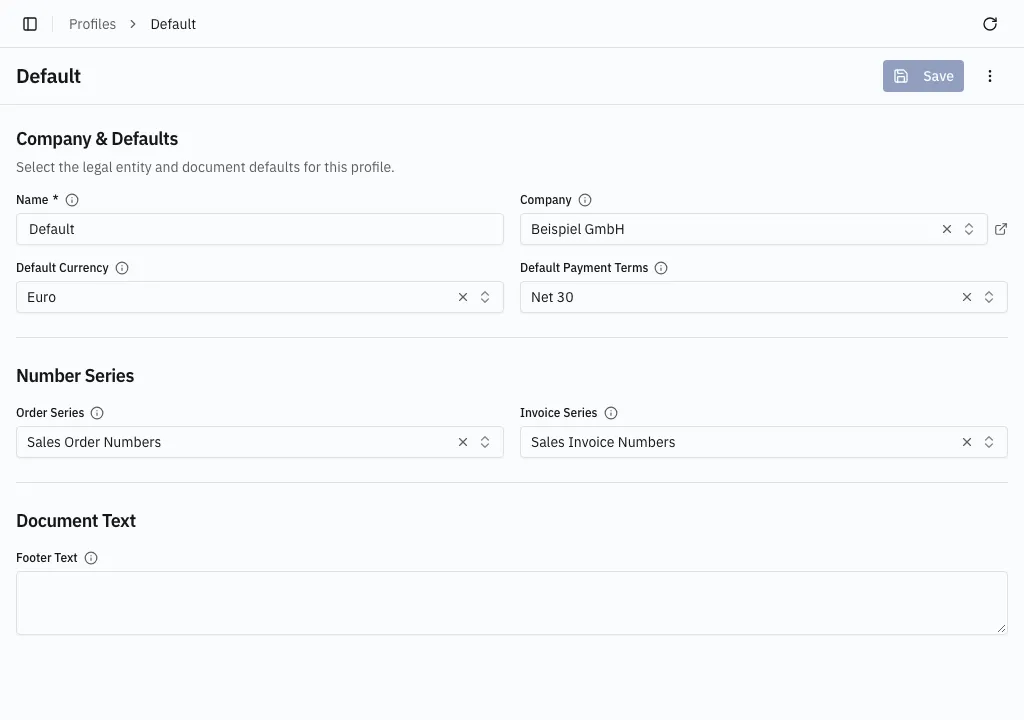
Add one profile per further selling identity — a B2B arm and a web shop, say. The profile is rarely chosen by hand: every business partner carries a Default Profile, and picking that customer proposes it onto the document. A document cannot be saved without one.
The lists that start empty
Section titled “The lists that start empty”- Product categories and product types organise products; business partner groups organise partners and can scope pricing.
- Shipping methods are a label on the order.
- Stock restrictions are hold reasons — see How stock is counted.
All five edit in a dialog. Only Profiles and Tax Classifications open a page of their own.
Document numbering, then tax, payment terms, locations and people.